
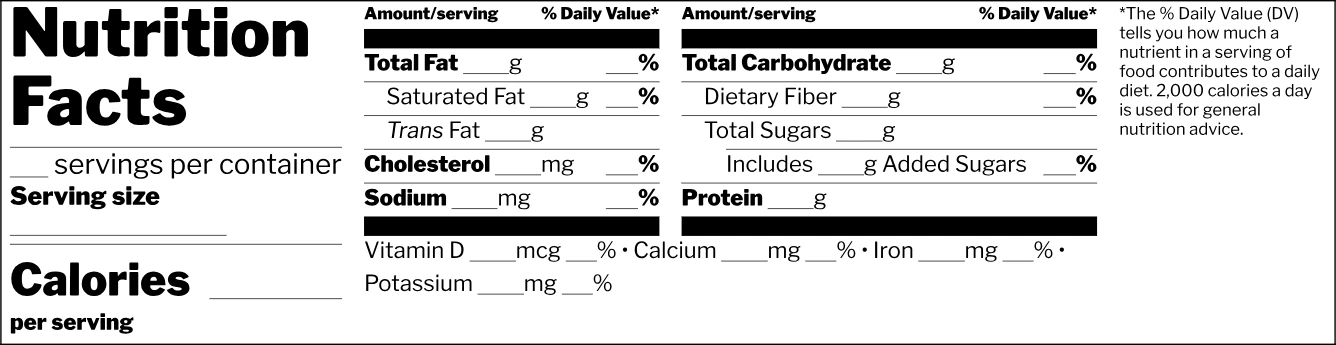
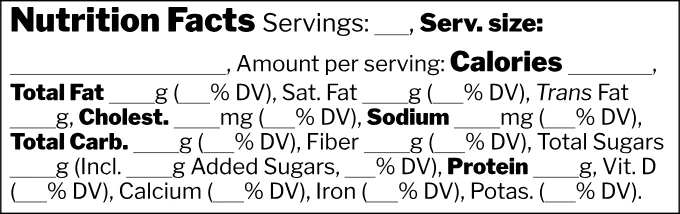
Blank Nutrition Facts Label Template

Skip drawing the panel from scratch: this blank nutrition facts label template follows FDA’s type sizes, bars and rules, ready to print, to view with sample values or to fill in.

  • 6 FDA formats
  • Blank or example
  • PDF, SVG, EPS and PNG
  • Free, no signup

Nutrition Facts Label Template

Pick a format

Six FDA formats, each as a blank template or filled with sample values. Download one as it is, or fill it in below.

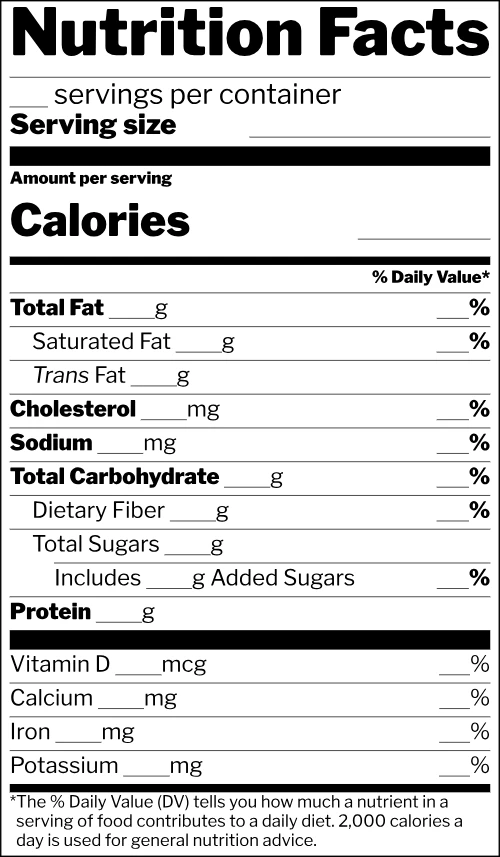
  • Blank nutrition facts label template, Standard vertical format

    Standard vertical

    The default vertical panel for most packaged food (21 CFR 101.9(d)).

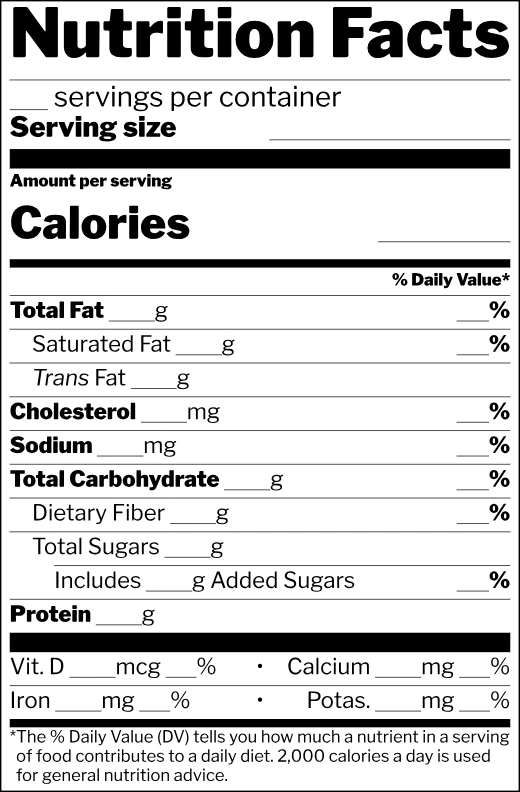
  • Blank nutrition facts label template, Vitamins side by side format

    Vitamins side by side

    The vertical panel with vitamin and mineral lines paired to save height (101.9(d)(8)).

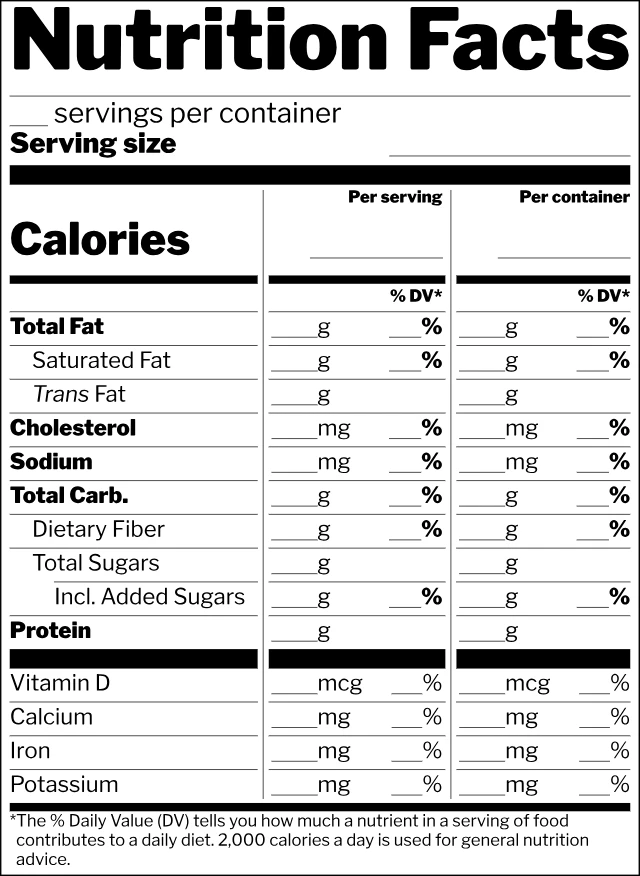
  • Blank nutrition facts label template, Dual column (per container) format

    Dual column (per container)

    Per serving and per package columns, required for 200% to 300% of the reference amount (101.9(b)(12)).

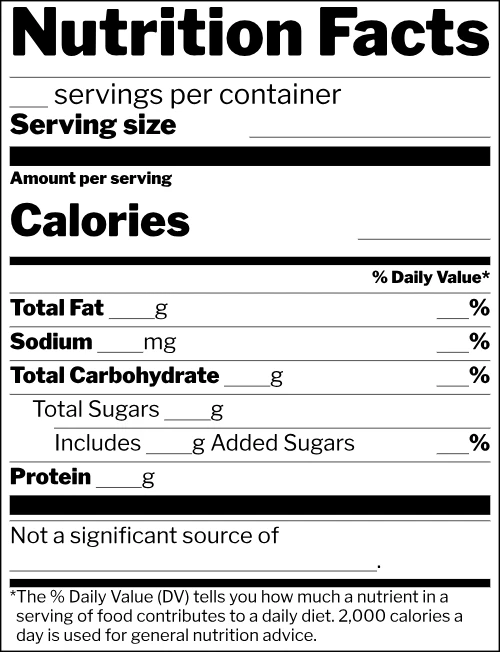
  • Blank nutrition facts label template, Simplified format

    Simplified

    For foods with insignificant amounts of 8 or more of the 15 core nutrients (101.9(f)).

  • Blank nutrition facts label template, Tabular format

    Tabular

    For panels with less than about 3 in of continuous height (101.9(d)(11)(iii)).

  • Blank nutrition facts label template, Linear format

    Linear

    For packages with 40 sq in or less when no other format fits (101.9(j)(13)(ii)(A)).

Classroom sheet: two large blank labels on a page

Standard labels printed at one and a half times their size, with room to write each number by hand, for a lesson on reading or inventing a food label.

Fill in a template

Enter your servings, serving size and amounts. The values are rounded to FDA rules, the % Daily Values are worked out for you, and the checks tab flags what doesn’t add up.

Label format

Serving

servings

8 servings per container

g

Nutrients per serving

230
kcal

From fat, carbohydrate and protein: about 216 to 232 kcal.

8g · 10%
g
1g · 5%
g
0g
g
0mg · 0%
mg
160mg · 7%
mg
37g · 13%
g
4g · 14%
g
12g
g
10g · 20%
g
3g
g
2mcg · 10%
mcg
260mg · 20%
mg
8mg · 45%
mg
240mg · 6%
mg

Size and color

mm
Type color
#
Background
#

Loading the label fonts…

Vector · outlined text · 100% K black
Saved in this browser
  • Free, no limits
  • No sign up needed
  • No watermark
  • Saved only where you choose

FDA does not approve food labels before they are sold. This template follows FDA’s format and type size rules, and the editor below rounds your numbers and tells you which formats your package may use.

FDA formats, blank or with sample values
6
file types: PDF, SVG, EPS and 300 dpi PNG
4
large blank labels on one classroom page
2
smallest standard blank at FDA type sizes
2.18 × 4.23 in

How to use this nutrition facts label template

Three steps take you from an empty panel to a finished label, whether you print the blank or fill it in on this page.

Standard vertical
Vitamins side by side
Dual column (per container)
Tabular
Linear
Simplified

A free nutrition label template drawn to FDA rules

Every card is drawn by the same engine as our nutrition label generator, line by line from FDA’s rule, so every bar and type size is the one the rule sets.

Specs
Nutrition Facts16+ pt¼ pt8 servings per container10 ptServing size2/3 cup (55g)10 pt7 ptCalories23016 · 22 pt3 ptTotal Fat 8g10%8 pt¼ ptSodium 160mg7%

Minimum sizes from 21 CFR 101.9(d)

Type sizes and rules from the regulation

A blank keeps every nutrient name, unit, % sign, bar, rule and type size of the filled label, and each empty place is underlined so it reads as a blank to fill. On the standard label that means 8 point nutrients, a 16 point "Calories" with room for a 22 point number, 7-point bars and quarter-point hairlines.

Blank nutrition facts label template, Standard vertical formatStandard vertical
Blank nutrition facts label template, Vitamins side by side formatVitamins side by side
Blank nutrition facts label template, Dual column (per container) formatDual column (per container)
Blank nutrition facts label template, Simplified formatSimplified
Blank nutrition facts label template, Tabular formatTabular
Blank nutrition facts label template, Linear formatLinear

Six FDA formats, blank or as an example

The examples print FDA’s sample product, 8 servings of 2/3 cup at 230 calories. The dual column example is a pint of ice cream, the simplified one a 12 fl oz soda and the linear one a roll of mints. Each blank is exactly the size of its example, so the space you plan with one fits the other.

Which label sheets each format fits on
Label sheetStandardSide by sideDual columnSimplifiedTabularLinear
3.5 in × 5 in, 4 per sheetFits3.25 in × 4.39 inFits3.25 in × 4.05 inFits3.25 in × 4.39 inFits3.25 in × 3.49 inDoes not fitFits3.25 in × 1.08 in
Avery 51644 in × 3.33 in, 6 per sheetDoes not fitDoes not fitDoes not fitFits3.08 in × 3.46 in (turned 90°)Does not fitFits3.75 in × 0.95 in
2 in × 5 in, 8 per sheetDoes not fitDoes not fitDoes not fitDoes not fitDoes not fitFits1.75 in × 1.97 in
Avery 51634 in × 2 in, 10 per sheetDoes not fitDoes not fitDoes not fitDoes not fitDoes not fitFits3.75 in × 0.95 in
Avery 228223 in × 2 in, 8 per sheetDoes not fitDoes not fitDoes not fitDoes not fitDoes not fitFits2.75 in × 1.23 in
Avery 228062 in × 2 in, 12 per sheetDoes not fitDoes not fitDoes not fitDoes not fitDoes not fitDoes not fit

Sized for common label sheets

A table shows which of six common label sheets each blank fits at FDA’s minimum type sizes, with 1/8 inch kept clear inside the label and each label tried both ways round. You know the fit before you buy a pack of labels.

Which format can I use?
Reference amount (RACC)55g
Net contents165g

The package holds 300% of the reference amount.

Standard verticalVitamins side by sideDual column (per container) · required

200% to 300% of the reference amount: a dual column label, per serving and per package, is required.

A format helper for your package

Enter the label area, the panel height and the reference amount in the editor. It tells you when tabular or linear is allowed, when a dual column label is required and when a small package may go without one.

  • PDFvector, 100% K black
  • SVGvector, for design apps
  • EPSvector, for older workflows
  • PNG300 / 600 dpi

Vector files ready for print

Text is converted to outlines, so the printer needs no fonts. The PDF and EPS print black as 100% K, the PNG is 300 dpi at the label’s true size, and blank file names end in -blank.

Does FDA offer a nutrition facts label template?

No. On its industry resources page for the label changes, FDA answers directly: "FDA has not provided label templates in the past and we do not plan to do so now." It suggests that companies use its sample labels and graphic illustrations as visual guides when they format their own labels, and adds that the private sector is equipped to provide labeling templates.

The label images FDA offers for download are marked "For educational purposes only". The templates on this page are built from FDA’s Nutrition Facts rule and the graphic specifications FDA recommends for it, so the format and type sizes come built in.

Checks2
  • Added sugars (13 g) cannot be more than total sugars (12 g). 21 CFR 101.9(c)(6)(iii) ↗
  • At 300% of the reference amount, the label must be dual column: per serving and per package. 21 CFR 101.9(b)(12)(i) ↗

Always applied by this generator

  • FDA rounding for every amount and %DV
  • No %DV for trans fat and total sugars
  • Bold only where the rule allows it

Which blank nutrition facts label format to use

The standard vertical label is the default for most packaged food (101.9(d)). Vitamins side by side puts vitamin D with calcium and iron with potassium on two lines to save height (101.9(d)(8)). A package that holds 200% to 300% of the reference amount, such as a pint of ice cream, shows a dual column label with one column per serving and one for the whole package (101.9(b)(12)(i)). The simplified format suits foods with insignificant amounts of eight or more of the 15 core nutrients, such as a soda (101.9(f)).

A panel with less than about 3 inches of continuous height may use tabular (101.9(d)(11)(iii)). A package with less than 12 square inches of label area, or 40 square inches or less when no panel holds a standard vertical label, may use tabular, and linear when tabular will not fit either (101.9(j)(13)(ii)(A)). So the right format depends on your package, not on the label sheet, and the format helper in the editor below works it out from your measurements.

< 12 sq in
No label needed without claims (print a phone or address)
≤ 40 sq in
If a standard label fits on no panel: tabular, then linear
< 3 in
Height under about 3 in: tabular
200 to 300% RACC
Dual column per serving and per package, required

What size to print a nutrition facts label template

FDA sets minimum type sizes, not a minimum label size. At those sizes the smallest each blank can be, width by height, is 2.18 × 4.23 inches for the standard template, 2.56 × 3.95 for vitamins side by side, 3.07 × 4.36 for dual column and 2.18 × 3.21 for simplified. Tabular takes 6.68 × 1.73 inches, and linear starts at 1.76 × 2.09 inches and gets shorter as it gets wider.

On label sheets, with 1/8 inch kept clear inside each edge and each label tried both ways round, a 3.5 × 5 inch label takes every format but tabular. A 4 × 3 1/3 inch label compatible with Avery® 5164 takes linear, and simplified turned 90°; 2 × 5 inch labels and labels compatible with Avery 5163 and 22822 take linear, a 2 × 2 inch label compatible with Avery 22806 is smaller than every format, and tabular is wider than all of these sheets. The table measures each format filled in with typical values, and the editor below shows the exact size of your own label, long serving sizes and extra vitamins included.

Smallest size of each blank template
FormatSmallest size (width × height)
Standard vertical2.18 in × 4.23 in
Vitamins side by side2.56 in × 3.95 in
Dual column (per container)3.07 in × 4.36 in
Simplified2.18 in × 3.21 in
Tabular6.68 in × 1.73 in
Linear1.76 in × 2.09 in

How to fill in a blank nutrition facts label

Every number on the label is rounded by its own FDA rule, which is why the editor does the rounding for you. Calories round to the nearest 5 up to 50 and to 10 above, fats to 0.5 g under 5 g and to 1 g above, sodium to 5 mg up to 140 mg and to 10 mg above, and carbohydrates, fiber, sugars and protein to 1 g. The % Daily Value compares each amount with its Daily Value, such as 78 g for total fat or 2,300 mg for sodium, and vitamins and minerals use 2%, 5% and 10% steps.

Fill in this template opens the editor below in that format, starting from FDA’s sample values (Clear empties them). It rounds every value, works out each % Daily Value and flags anything that does not add up in the Checks tab, for the label on most packaged food: adults and children 4 years and over.

Your label is saved in this browser as you work; save a project file, or sign in and choose Save to account, to open it elsewhere.

Math
  • Calories47 kcal → 45

    up to 50 kcal: nearest 5

  • Saturated Fat0.4 g → 0g

    under 0.5 g shows as 0

  • Cholesterol3 mg → <5mg

    2 to 5 mg shows as "less than 5mg"

  • Sodium146 mg → 150mg · 7%

    over 140 mg: nearest 10 mg

Using the nutrition label template in Word, Canva or Illustrator

Word in Microsoft 365 can insert the SVG or the PNG, and Google Docs and Canva take the PNG, which at 300 dpi prints sharp at its real size. Illustrator, InDesign and Inkscape open or place the PDF, EPS or SVG, the vector files a packaging printer wants.

To add your values, fill in the template here and download the finished label. By hand or in another program, keep the printed units and % signs, round by the same rules and set each value at the template’s type sizes or larger. Place the label at its true size, so every line keeps FDA’s minimums.

Print file check
  • Color: 100% black (K), one plate
  • Text outlined: the printer needs no fonts
  • Actual size: 2.50 × 4.30 in
  • No watermark, free to use on your products
C 0%M 0%Y 0%K 100%

Blank nutrition facts label sheets for the classroom

Teachers use a blank label for lessons on reading food labels: students copy the numbers from a real package and compare serving sizes, calories and % Daily Values. Another favorite is to invent a food, fill in its label and explain each line.

The classroom sheet prints two blank standard labels at one and a half times their size on one Letter or A4 page, with room to write each number by hand. For a cereal box book report, pair it with the cereal box template: students fill in a label for their cereal and glue it on the box they made.

A printable page of two large blank nutrition facts labels
Two large blank labels on one Letter or A4 page

Do cottage foods need a Nutrition Facts label?

Usually not. Most states ask for a Nutrition Facts panel on cottage food only when the label makes a nutrition claim such as "low fat" or "sugar free". State rules vary, and the cottage food label maker sets up the label for yours.

Stores often ask for one anyway. Fill in this template with numbers from a lab or recipe analysis, then choose Put on a food label under the editor’s downloads: the panel opens in the food label maker, where Design with AI paints the label’s artwork around it, using credits.

  1. 1Any nutrient claim or other nutrition information on the label, in labeling or in ads?

    YesFull Nutrition Facts label
    No
  2. 2Selling direct to consumers, with sales of $500,000 or less a year, or food sales of $50,000 or less?

    YesExempt: small retailer
    No
  3. 3Fewer than 100 full time equivalent employees, and fewer than 100,000 units of this product sold in the US a year?

    YesExempt: low volume, with a notice to FDANo notice needed with fewer than 10 employees and fewer than 10,000 units, unless you import the food.
    No
None of theseNutrition Facts label required

States and stores can still ask for a label. Source: 21 CFR 101.9(j)(1) and (j)(18), eCFR as of 6 October 2026.

Who uses a blank nutrition facts label

From a first production run to a classroom lesson, a ready blank saves drawing the panel from scratch.

Small food brands

Plan the pack around a blank while the lab tests your product, then fill it in, put it on a food label and let AI design the artwork around it.

Bakeries and farmers market sellers

Print a simplified or standard label when a store asks for one, even under the exemption line.

Packaging designers

Drop an outlined, true size vector panel into the artwork and keep room for it from the first sketch.

Teachers and students

Print two large blank labels on a page for a lesson, or put the PNG into a class project.

Nutrition facts label template FAQ

More questions? The Checks tab in the editor explains each problem with a link to the rule.

Choose a format

Is this nutrition facts label template free?

Yes. Every format, blank or example, and every file type is free, with no signup, no watermark and no limit, and you can use the labels on products you sell.

Does FDA provide a nutrition facts label template?

No. FDA says it "has not provided label templates in the past" and does not plan to, and the label images it offers are "For educational purposes only" and do not meet 21 CFR 101.9. Use FDA’s sample labels as visual guides, or a template drawn to the rules like this one.

Is a blank nutrition facts label FDA approved?

No label is: FDA does not review food labels before sale. The template follows FDA’s format and type size rules, and the editor names the rule behind each check.

Can I edit the nutrition facts label template in Word?

Word in Microsoft 365 inserts the SVG or the PNG. The quickest way to a finished label is to fill in your values on this page and download it ready to place, or type your own text in the blank places at the template’s type sizes or larger.

How small can a nutrition facts label template be?

FDA sets minimum type sizes rather than a minimum label size. At those sizes the standard blank is at least 2.18 inches wide and 4.23 inches tall, and small packages may qualify for tabular or linear. Print a downloaded label at 100%.

Which label sheets fit a blank nutrition facts label?

A 3.5 × 5 inch label takes every format but tabular, and a 4 × 3 1/3 inch label compatible with Avery® 5164 takes linear, and simplified turned 90°. Narrower labels, such as 2 × 5 inches, take linear. The fit table on this page lists every format on six common sheets.

Can students use a blank nutrition facts label for homework?

Yes. The classroom sheet prints two large blank standard labels on a Letter or A4 page, big enough to fill in by hand, for lessons on reading labels or for a food students invent.

What language is the nutrition label template in?

English, the language US food labels require, in the templates and the editor alike. A pack using another language anywhere gives all required information in both, a translated Nutrition Facts panel included.

Get your nutrition facts label template

Pick one of the six FDA formats, download it blank or as an example, or fill in your numbers for a print-ready label.