
Seedream 5.0 Image Generator

Make images with Seedream 5.0 Pro from ByteDance: dense layouts, type in many languages and photo real products, with the credits shown before you start.

  • Made by ByteDance
  • Text in more than ten languages
  • Up to 2K, about 4.2 MP
  • Four more models in the same menu

Seedream 5.0

Seedream 5.0AI enhance
0 / 4000

Made with Seedream 5.0

Real AI-generated examples, each made with Seedream 5.0 Pro in this generator. Click one to fill in its prompt, text and settings, then change what you like.

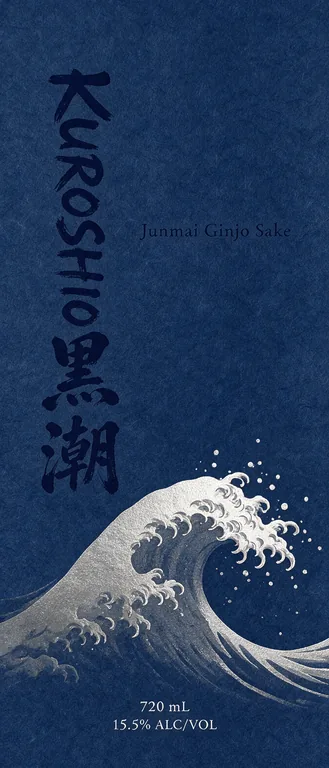
  • Sake label for KUROSHIO 黒潮 Junmai Ginjo Sake, an AI-generated example made with Seedream 5.0 Pro
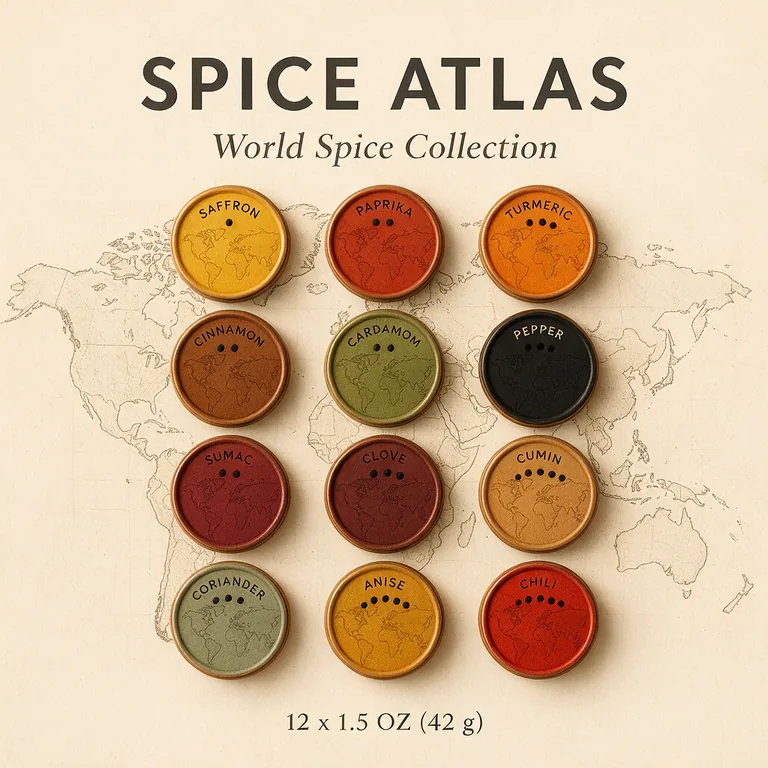
  • Spice tin set for SPICE ATLAS World Spice Collection, an AI-generated example made with Seedream 5.0 Pro
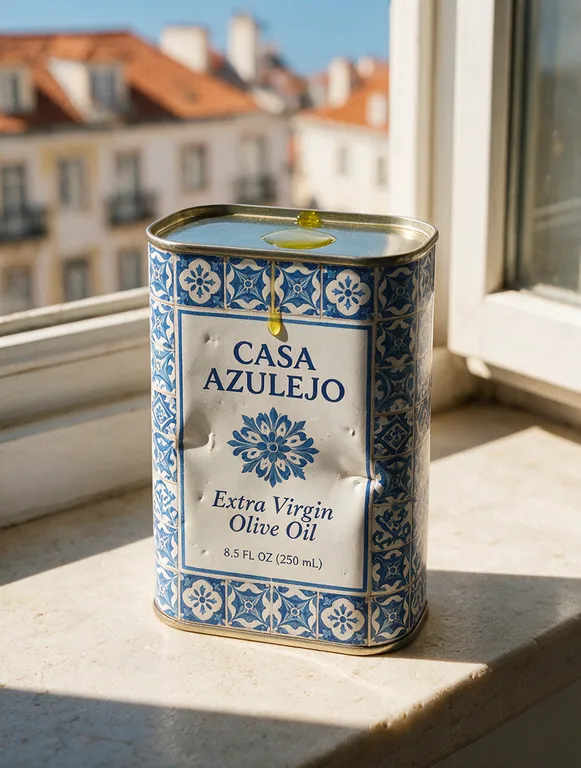
  • Olive oil tin for CASA AZULEJO Extra Virgin Olive Oil, an AI-generated example made with Seedream 5.0 Pro
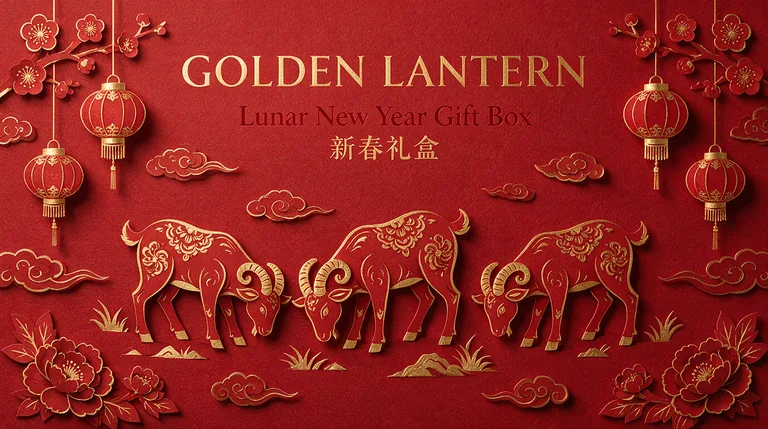
  • Lunar New Year box for GOLDEN LANTERN Lunar New Year Gift Box 新春礼盒, an AI-generated example made with Seedream 5.0 Pro
  • Recipe back panel for SUNDAY STACK Buttermilk Pancake Mix, an AI-generated example made with Seedream 5.0 Pro
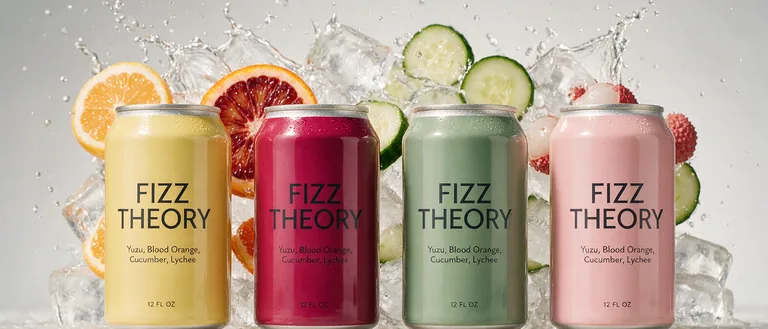
  • Sparkling water cans for FIZZ THEORY Yuzu, Blood Orange, Cucumber, Lychee, an AI-generated example made with Seedream 5.0 Pro
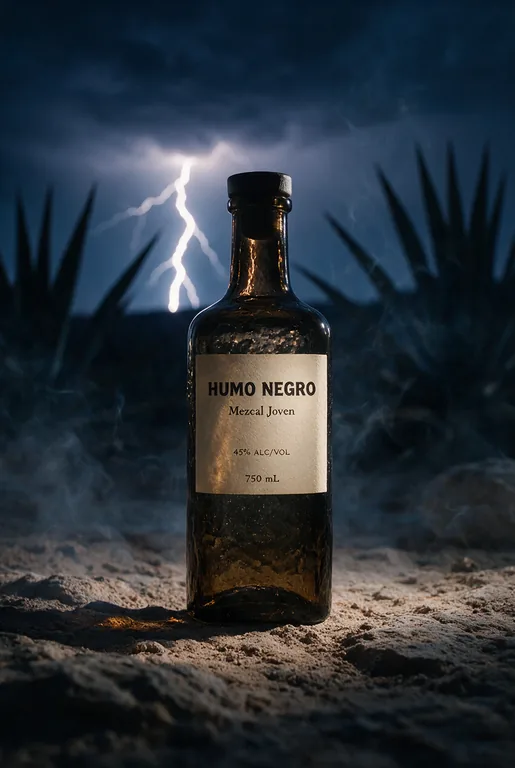
  • Mezcal bottle for HUMO NEGRO Mezcal Joven, an AI-generated example made with Seedream 5.0 Pro
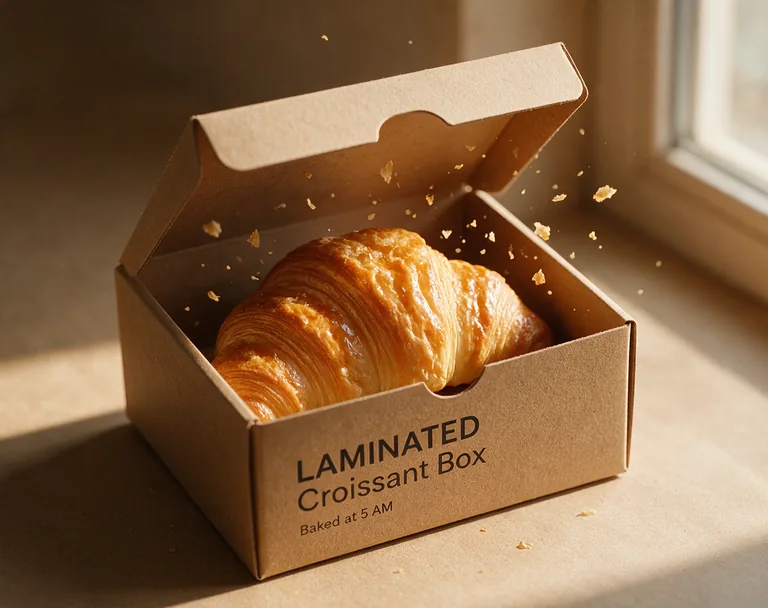
  • Bakery box for LAMINATED Croissant Box, an AI-generated example made with Seedream 5.0 Pro

Seedream is made by ByteDance. Pack AI Studio runs the Pro version through fal.ai and is not affiliated with or endorsed by ByteDance. Image generation is part of the paid plans, and credits for a failed run come back. Check every word before you print.

largest size, about 4.2 megapixels
2K
credits an image at 1K or 1.5K, 22 at 2K
11
reference images in one run
10
aspect ratios, from 21:9 to 9:21
11

How to use Seedream 5.0 here

The generator opens on the Pro version of the model. Three steps, and the button shows the credits before anything is charged.

What Seedream 5.0 does well

Based on what ByteDance built the model for and what our own examples show.

Spice tin set for SPICE ATLAS World Spice Collection, an AI-generated example made with Seedream 5.0 Pro
AI-generated example · Seedream 5.0 Pro

Dense, orderly layouts

Grids, step panels and information-heavy designs hold together: twelve tin lids, four recipe steps, a row of flavors. ByteDance aimed the model at infographics and structured designs.

Lunar New Year box for GOLDEN LANTERN Lunar New Year Gift Box 新春礼盒, an AI-generated example made with Seedream 5.0 Pro
AI-generated example · Seedream 5.0 Pro

Type in more than ten languages

Chinese, Japanese, Korean, Arabic and more render natively, so a bilingual gift box or an export label can carry both scripts. Type each one exactly as it should print.

Olive oil tin for CASA AZULEJO Extra Virgin Olive Oil, an AI-generated example made with Seedream 5.0 Pro
AI-generated example · Seedream 5.0 Pro

Photo real products

Printed tin, glass, paper grain and a drip of oil read as real. Ask for a product photo and Seedream shows the package in its scene with your artwork on it.

Sparkling water cans for FIZZ THEORY Yuzu, Blood Orange, Cucumber, Lychee, an AI-generated example made with Seedream 5.0 Pro
AI-generated example · Seedream 5.0 Pro

Wide and tall formats

All 11 aspect ratios are open, from a 21:9 banner of four cans to a 9:21 bottle label. Nano Banana 2.1 stops at 21:9 and has no tall 9:21.

You type

A tall sake bottle label: bold vertical brush calligraphy beside a small English line, a great wave in silver foil look, washi paper grain, indigo and white.

AI enhance writes

Flat print-ready tall sake bottle label artwork, vertical rectangular format, washi paper grain texture across the background. Bold vertical brush calligraphy reading "KUROSHIO 黒潮" runs down the left side in deep indigo ink. Beside it, a small English line reads "Junmai Ginjo Sake". Across the lower section, a stylized great wave rendered in a silver foil look curls and crests, with fine spray lines, in silver against indigo. Small text "720 mL" and "15.5% ALC/VOL" sit neatly near the bottom edge in white. Color palette limited to indigo, white and silver foil tones. Composition is centered and balanced with generous margins, shown straight-on with even, soft studio lighting and no shadows or perspective. Clean, minimal Japanese graphic style, no extra text, no logos, no borders or decorative symbols beyond the wave.

AI enhance

A short request becomes a full brief: subject, setting, camera, light, palette and where each line of text sits. Words in quotes and the text fields stay as you typed them.

  • GPT Image 2.5 FlarePrecise text, fasterfrom 10 credits
  • GPT Image 2.5 SunburstPrecise text, finer detailfrom 10 credits
  • Nano Banana 2.1Many references, extra widefrom 8 credits
  • Seedream 5.0 ProPhoto real, high resolutionfrom 11 credits
  • Muse ImageLow cost draftsfrom 2 credits

Four other models a click away

This model is marked in the menu next to GPT Image 2.5 Flare and Sunburst, Nano Banana 2.1 and Muse Image. Switch at any time; the button updates the credits.

What Seedream 5.0 is, as of October 2026

Seedream is the image model family of ByteDance Seed, ByteDance’s research team. ByteDance introduced Seedream 5.0 Pro on July 8, 2026 as one model for making and editing images, with four headline areas: complex information graphics, precise editing, realistic texture and native text in many languages. A cheaper Lite version sits below it.

ByteDance is open about the limits. Its launch post says there is "still room to improve in finer-grained text rendering and pixel-level editing consistency". In practice, headlines come out clean while long small print can still slip, so treat every Seedream image as artwork to check, not a finished label.

We run the Pro version through fal.ai, the same way we run the other four models in the menu. Facts on this page were checked against ByteDance, BytePlus and fal pages in October 2026.
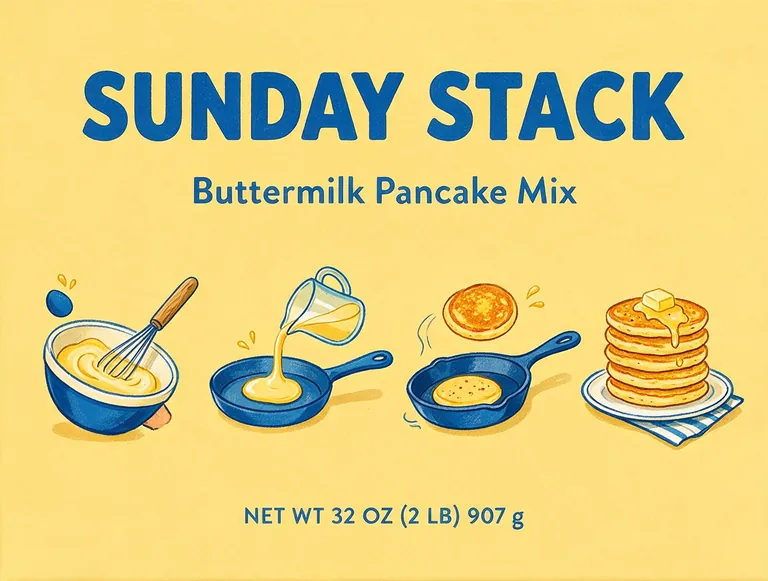
Recipe back panel for SUNDAY STACK Buttermilk Pancake Mix, an AI-generated example made with Seedream 5.0 Pro
AI-generated example · Seedream 5.0 Pro

Seedream 5.0 specs and credits on Pack AI Studio

Size: 1K (about 1 megapixel), 1.5K (about 2.4) or 2K (about 4.2, 2048 by 2048 on a square). That is the top of what the Pro version makes: BytePlus lists 1K, 1.5K and 2K for Pro and keeps 3K and 4K for Lite. When a site promises 4K from Seedream 5.0, it is running Lite, an older Seedream or an upscaler.

Credits: 11 an image at 1K or 1.5K and 22 at 2K, 1 to 4 images a run, so 1.5K gives more detail for the same price. References: up to 10, such as a logo, a product photo or a style you like (fal lists the same limit). Shapes: all 11 aspect ratios. Time: usually 15 to 90 seconds. In our own test on October 9, 2026, one packaging prompt took 47 seconds and printed "MOSS & CO" and "NET WT 4 OZ (113 g)" correctly.

You get a PNG. ByteDance’s own API can also split an image into layers, but this generator returns one flat image, so rebuild exact text and barcodes in your design file. Credits come with the plans on pricing, and a run that fails returns its credits.

Bakery box for LAMINATED Croissant Box, an AI-generated example made with Seedream 5.0 Pro
AI-generated example · Seedream 5.0 Pro

Seedream 5.0 compared with the other models here

GPT Image 2.5 Flare and Sunburst (OpenAI) cost 10, 12 or 15 credits by size and take up to 4 references. They are the safest choice when many lines of small text must be exact. Seedream costs one credit more at 1K and 7 more at 2K, and earns it on materials, light and crowded layouts.

Nano Banana 2.1 (Google) costs 8 credits at 1K and 11 at 2K, takes up to 10 references and is built for editing from a photo; it has no 9:21. Muse Image (Meta) makes a 2 credit draft at one size, about 2.5 megapixels, handy for trying ideas before you spend on Seedream.

A good routine: sketch directions with Muse Image, then run the favorite on Seedream 5.0 at 1.5K for the final look, or on GPT Image 2.5 when the label carries lots of fine print. Each model has its own page and examples: GPT Image 2, Nano Banana 2 and Muse Image.

Mezcal bottle for HUMO NEGRO Mezcal Joven, an AI-generated example made with Seedream 5.0 Pro
AI-generated example · Seedream 5.0 Pro

Packaging prompt tips for Seedream 5

Keep exact words out of the description and type them in Text to print, where each field is sent in quotes and AI enhance keeps it word for word. For two scripts, put both in one field, as in "Lunar New Year Gift Box 新春礼盒", and ask a native reader to check the characters before print.

Type the net quantity the way the rules want it, and Seedream 5 will copy it. On US food packages it goes in the bottom 30% of the front panel in bold type (21 CFR 101.7), in both US and metric units (15 U.S.C. 1453), such as "NET WT 24 OZ (680 g)". Spirits such as mezcal state alcohol as a percentage by volume, and TTB does not accept "ABV" in that statement (27 CFR 5.65), so type "45% ALC/VOL".

Name the material and the light: "lithographed tin with small dents", "kraft box in soft morning light". Concrete nouns give the model more to work with than words like premium or beautiful.

From a Seedream image to a printed package

Use the image as artwork and as a reference, not as the print file. Build the box in our free dieline generator, place the artwork under its cut and fold lines, and add the exact parts from free tools: a scannable code from the UPC barcode generator and a panel from the nutrition label generator.

To design a whole box on its dieline, use AI packaging design, which sends the flat dieline to the model as a reference. Seedream 5.0 is in its model menu too.

Who uses Seedream 5.0

People who need an image that looks finished, not a mood board.

Export and bilingual brands

Labels and gift boxes with English beside Chinese, Japanese or another script, each typed exactly in the text fields.

Food and drink makers

Product photos of tins, bottles and cans for a shop page or a pitch deck, before the first print run.

Brands with a lot to say

Back panels, how-to steps and collection grids, where Seedream keeps many parts in order.

Bakeries and cafes

Close-up shots of a box with the food inside, for menus, social posts and launch pages.

Seedream 5.0 questions

What people ask about the model and about running it here.

Generate with Seedream 5.0

What is Seedream 5.0?

Seedream 5.0 is ByteDance’s image model family. The Pro version, released on July 8, 2026, makes and edits images with dense layouts, realistic texture and text in many languages; this page runs the Pro version.

Is Seedream 5.0 free here?

No. Each image costs 11 credits at 1K or 1.5K and 22 at 2K, and credits come with the plans on the pricing page. A failed run returns its credits.

Can Seedream 5.0 make 4K images?

Not the Pro version: BytePlus lists 1K, 1.5K and 2K for the Pro version and up to 4K for Lite. Here the largest size is 2K, about 4.2 megapixels.

Which languages can Seedream 5 write?

ByteDance says more than ten, and BytePlus lists 14 beyond Chinese and English, including Japanese, Korean, Arabic, Spanish and French. Type the text exactly in the fields and have a native reader check it.

Is Seedream better than GPT Image?

It depends on the job. Seedream 5.0 is our pick for photo real materials and dense layouts, and GPT Image 2.5 is the safer pick for many lines of small, exact text. Both are in the same menu.

Can I edit a photo with Seedream 5.0?

Yes. Add up to 10 reference images, such as a product photo or a logo, and say what to change and what to keep.

Is Pack AI Studio part of ByteDance?

No. Seedream is made by ByteDance; we run its Pro version through fal.ai with four other models, and we are not affiliated with or endorsed by ByteDance.

What content is not allowed?

No nudity, sexual content or gore, in prompts, uploads or results. Such requests are refused before any credits are charged.

Try Seedream 5.0 now

Describe the image, type the exact words and pick a size. The generator starts on this model and shows the credits before it runs.